 ultimate-guide
Cat6 Network Cabling for Offices: Ultimate Guide
Table of Contents
- What is Cat6 Cabling and Why It Matters for Offices
- Benefits of Cat6 for Office Networks
- The Best Way to Route Cat6 Cables Through Internal Walls
- Office Network Cabling Standards BS EN 50173
- Cat6 Cable Length Limitations and Network Performance
- Installation Best Practices for Office Environments
- Testing and Certification of Office Network Cabling
- Pure Copper vs. CCA Cables: What You Need to Know
- Frequently Asked Questions
Last Updated: September 30, 2026
What is Cat6 Cabling and Why It Matters for Offices
Cat6 network cabling is the modern standard for commercial data infrastructure, supporting gigabit speeds and beyond. Your physical network foundation directly impacts employee productivity and system reliability.
Cat6 contains eight copper conductors in four twisted pairs, housed in a PVC or plenum-rated jacket. This construction achieves 10 Gbps over 55 metres, substantially faster than Cat5e's 1 Gbps maximum.
Cat6 vs. Cat5e vs. Cat7: Key Differences
Cat5e supports gigabit speeds but struggles with higher bandwidth demands. Cat6 doubles bandwidth capacity and reduces attenuation significantly. Cat7 offers greater shielding but requires specialist termination and is rarely deployed in standard offices due to cost and complexity.
Cat6 represents the practical sweet spot for most offices, delivering future-proofing without Cat7's complexity. The performance gap becomes apparent when running multiple high-bandwidth applications simultaneously, video conferencing, file transfers, and cloud tools all demand cleaner signal paths.
Shielded (STP) vs. Unshielded (UTP) Cables
Shielded twisted pair (STP) cables use metallic shielding to block interference; unshielded twisted pair (UTP) relies on twist rate. For most offices, UTP cat6 is sufficient and cost-effective. STP becomes necessary when cables run parallel to high-power electrical lines or in heavy RF interference environments.
STP requires proper grounding at both ends; improper grounding degrades performance. UTP avoids this complexity, making it standard for typical office networks.
Benefits of Cat6 for Office Networks
Cat6 network cabling for offices delivers tangible operational advantages. The investment in proper cabling infrastructure pays dividends through improved reliability, reduced troubleshooting time, and genuine future-proofing against bandwidth demands.
Speed, Bandwidth and Gigabit Performance
Cat6 supports 10 Gbps over shorter distances and maintains gigabit speeds over 100 metres (55 metres recommended for 10 Gbps). This bandwidth headroom handles simultaneous heavy users without degradation, a team of 50 running video calls and file transfers experiences noticeably better performance than on Cat5e.
File transfers taking 45 seconds on Cat5e take 8-10 seconds on cat6. Video conferencing stability and application response times improve, differences that compound across dozens of employees daily.
Reduced Crosstalk and Signal Integrity
Crosstalk degrades performance over longer runs. Cat6's tighter twist specifications reduce crosstalk by roughly 50% compared to Cat5e, enabling cleaner signal paths and fewer retransmissions.
A 90-metre run of properly installed cat6 outperforms Cat5e by a measurable margin. Correct termination, cable separation, and cable management all preserve signal integrity.
The Best Way to Route Cat6 Cables Through Internal Walls
Routing decisions determine whether cabling performs as designed. Poor routing creates signal interference, complicates maintenance, and creates fire safety risks.
Planning Cable Paths and Avoiding Interference
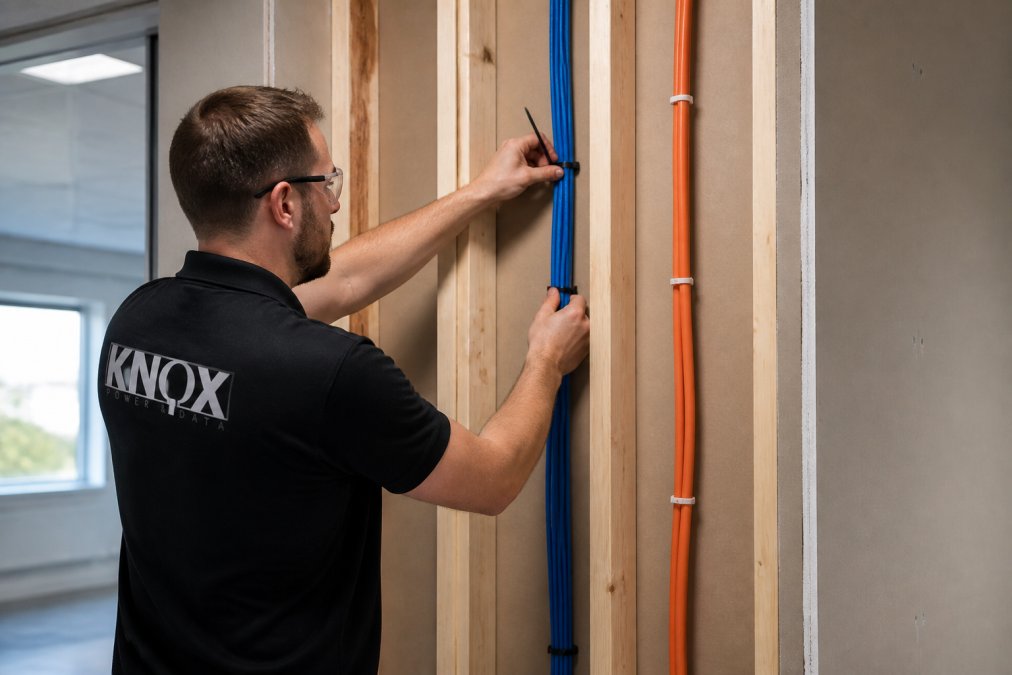
Map your network topology and identify data closet, switch, and workstation locations. Plan vertical runs through cable trays or conduit rather than horizontal wall runs, they're easier to manage, modify, and inspect.
Avoid running cat6 cables parallel to electrical power lines.
Separation from Power Lines and Fire Safety
UK Building Regulations require specific separation between data and power infrastructure. BS EN 50173 specifies minimum distances and crossing protocols to prevent interference, signal degradation, and fire risk.
Office Network Cabling Standards BS EN 50173
Compliance with UK cabling standards isn't optional, it's a legal requirement for commercial installations. BS EN 50173 defines the infrastructure standards that ensure safety, performance, and compatibility.
Compliance Requirements and Building Regulations
BS EN 50173 specifies cable types, installation practices, maximum run distances, termination practices, and testing procedures that verify performance.
Plenum-Rated vs. Riser-Rated Cables
Plenum-rated cables use low-smoke, halogen-free materials; riser-rated cables are less stringent but still fire-resistant. Plenum-rated is required for air plenums; riser-rated suffices for enclosed wall cavities.
Cat6 Cable Length Limitations and Network Performance
Distance matters. Cat6 performance degrades predictably with cable length due to attenuation, the weakening of signal strength over distance. Understanding these limitations prevents overbuilding or underspecifying your infrastructure.
Maximum Run Distances and Attenuation
Industry standard maximum for cat6 is 100 metres for gigabit speeds, with 55 metres recommended for 10 Gbps. Beyond 100 metres, attenuation causes packet loss and retransmissions.
Power over Ethernet (PoE) Considerations
Power over Ethernet allows cat6 cables to deliver data and power to IP cameras, wireless access points, and VoIP phones, increasingly valuable as offices deploy more networked devices.
Installation Best Practices for Office Environments
Professional installation separates a network that performs reliably for a decade from one that creates ongoing problems. The difference lies in attention to termination, cable management, and adherence to standards.
Termination, Punch Down and RJ-45 Connectors
Termination is where most amateur installations fail. Each of eight conductors must be terminated in correct sequence (T568A or T568B, consistency matters more than which standard). Improper termination introduces crosstalk and intermittent issues.
Cable Management and Workstation Connectivity
Cable management affects both performance and aesthetics. Cables secured with cable ties should be loose enough that you can slide a finger underneath, tight binding creates pressure points that degrade performance over time. Cable runs should follow straight paths without sharp bends. A minimum bend radius of 25mm prevents conductor damage.
Common Installation Mistakes to Avoid
Mixing cable standards in a single run creates unpredictable performance. A run that combines Cat5e and cat6 performs at Cat5e speeds. Plan your infrastructure consistently, if you're installing cat6, use cat6 throughout.
Testing and Certification of Office Network Cabling
Testing separates professional installations from DIY attempts. Proper testing verifies that your infrastructure meets standards and performs as designed.
TIA/EIA Standards and Throughput Verification
The Telecommunications Industry Association (TIA) and Electronics Industries Alliance (EIA) define standards for cabling testing. TIA/EIA 568 covers termination standards. TIA/EIA 1152 covers cat6 cable performance specifications. Testing equipment verifies that installed cabling meets these standards.
Why Professional Certification Matters
Professional certification provides documentation that your installation meets standards. This documentation is essential for compliance, insurance, and troubleshooting. If a cabling issue emerges years later, certification records prove that the installation was correct when completed.
Pure Copper vs. CCA Cables: What You Need to Know
Cable conductor material directly impacts performance, longevity, and reliability. This choice matters more than most installers acknowledge.
Frequently Asked Questions
What type of Ethernet cable is best for a home office or small business?
Cat6 cabling is the best choice for most office environments today. It supports Gigabit speeds up to 10Gbps over shorter distances, handles multiple devices simultaneously, and resists crosstalk better than older Cat5e cables. Cat6 offers future-proofing without the premium cost of Cat6a or Cat7. For voice and data cabling in professional settings, Cat6 meets TIA/EIA standards and complies with BS EN 50173 infrastructure requirements.
What are the most common mistakes when installing Cat6 cabling?
The biggest mistakes include: exceeding maximum cable run lengths (100 metres for Cat6), failing to separate cables from power lines which causes interference and crosstalk, using CCA (Copper Clad Aluminum) instead of pure copper conductors, improper RJ-45 termination leading to signal loss, and neglecting to use plenum-rated cables in air plenums for fire safety. Poor cable management also damages cables during installation, reducing transmission speed and throughput reliability.
Do I need shielded or unshielded Cat6 cabling for my office?
UTP (unshielded twisted pair) Cat6 is sufficient for most office environments and is more cost-effective. However, STP (shielded) Cat6 is necessary if your office has significant electromagnetic interference from machinery, high-density power distribution, or proximity to radio transmitters. Shielded cables require proper grounding at the patch panel to be effective. Consult BS EN 50173 standards to determine your office's specific requirements based on environment and workstation density.
What are the building regulation requirements for office data cabling?
Office network cabling must comply with BS EN 50173 (structured cabling standards) and Building Regulations Part R (Physical infrastructure). Cables routed through air plenums must be plenum-rated for fire safety. Cable separation from power lines is mandatory to prevent interference. All installations should include proper termination, testing, and certification to verify signal integrity and throughput. Professional testing to TIA/EIA standards ensures your infrastructure meets compliance and performs reliably.
How does Cat6 cable length affect network speed and performance?
Cat6 supports full Gigabit speeds (10Gbps) up to approximately 55 metres; beyond that, attenuation degrades signal quality and throughput. The maximum recommended run length is 100 metres including patch cables. If your office requires longer distances, you'll need a network switch or repeater to maintain signal integrity. Exceeding these limits causes latency and data loss. Professional installation ensures proper cable routing and termination to maximise performance within length specifications.
What is Power over Ethernet (PoE) and does my Cat6 cabling support it?
PoE allows Cat6 cables to deliver both data and electrical power to devices like IP cameras, wireless access points, and VoIP phones, eliminating the need for separate power cables. Standard Cat6 supports PoE without modification. However, high-power PoE+ (up to 95 watts) may require larger conductor gauge (AWG) or additional considerations for cable runs over 55 metres. Verify your network switch supports PoE output and plan cable infrastructure accordingly during installation.
How do I know if my Cat6 cabling installation is properly certified?
Professional certification involves testing each cable run to TIA/EIA standards using a certified tester that verifies bandwidth capacity, signal integrity, and absence of crosstalk. A certified installer should provide documentation showing all runs meet Cat6 specifications and comply with BS EN 50173. This certification protects your investment, ensures reliable performance, and provides evidence of compliance for building inspections or insurance purposes. Always request certification documentation before final payment.